How to avoid NRL spoilers until you've watched the replay
Recording the game to watch after the kids are down? Flying during the match? Nothing ruins a replay like a stray notification, a mate's text, or a scoreline glimpsed on someone else's phone. Here's a checklist that actually works - including the part most people miss: your own footy app.
The spoiler checklist
1. Silence the obvious sources
- Notifications: mute news and sports apps for the evening, or flick on Do Not Disturb / a Focus mode until you've watched.
- The group chat: mute it - or better, tell them you're watching later. A good group chat respects the replay. A great one tests you anyway.
- Social feeds: just don't. One scroll past a fan account and it's over.
2. Watch out for ambient spoilers
Pub TVs, radio in the taxi, the servo counter with the game on - if it's a big match, the score is in the air. Earphones and a podcast are your friend on the trip home.
3. The one everyone forgets: your scores app
You open your footy app to check another game's score - and there's your team's result, front and centre. Most live-scores apps have no concept of "I haven't watched this one yet". That's the gap Six Again closes.
Avoid Spoilers mode in Six Again
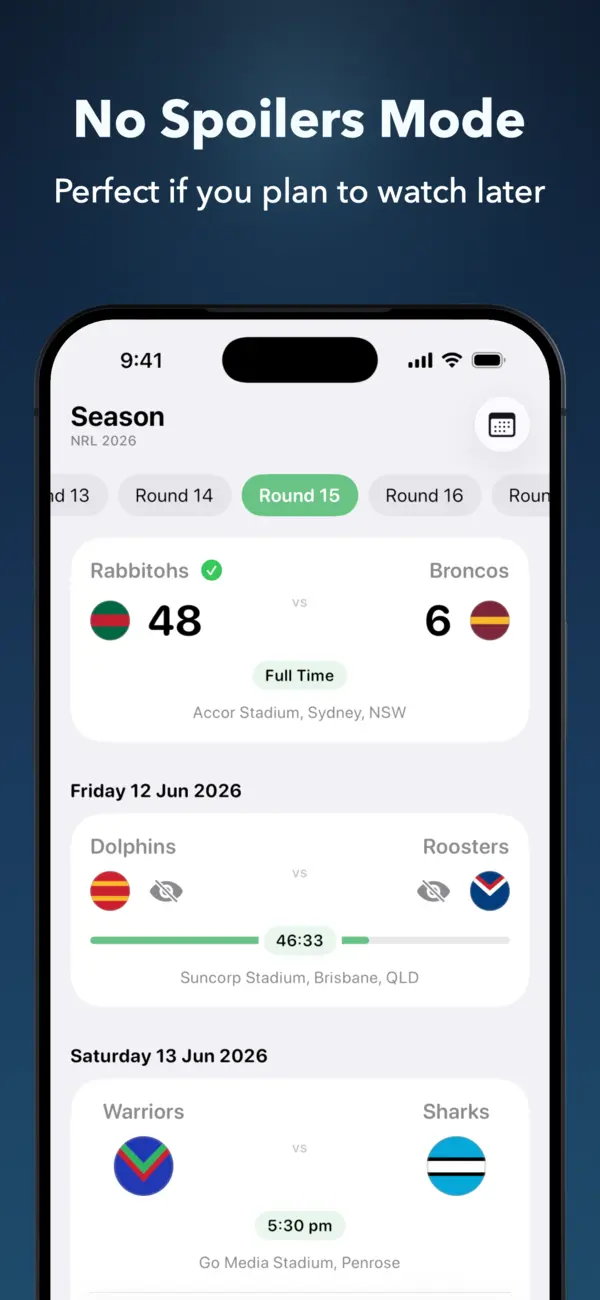
Pick the teams you want to stay spoiler-free for, and Six Again hides their scores across the Live and Season tabs from kick-off until 24 hours after the match starts. It won't start a lock-screen Live Activity for those teams either - unless you deliberately follow that match yourself.
- In Six Again, turn on Avoid Spoilers for the teams whose games you tend to watch on replay.
- Keep using the app as normal - every other match shows live scores, the ladder still updates, your spoiler game stays blank.
- Watch the replay whenever suits. After 24 hours the score quietly reappears.
The result: you can keep across the rest of the round without tiptoeing around your own phone.
Watch it like it's live
Live scores for every game except the one you're saving. That's the way it should work.